Short answer: yes — but usually not by much
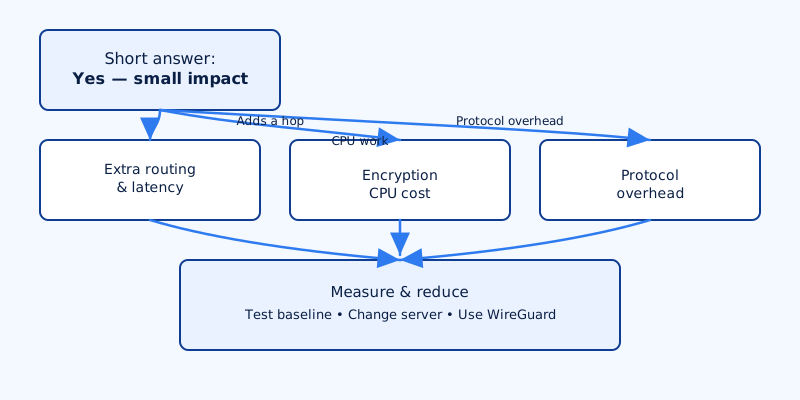
Does a VPN slow down your internet? Yes. A VPN adds encryption and an extra network hop, so some slowdown is expected. With modern protocols and a well-provisioned provider the impact is often small and unnoticeable for everyday web browsing and streaming. The real-world effect depends on several technical factors — device CPU, protocol choice, server location and load, your ISP, and even MTU settings. This article explains what actually affects speed and how to measure and reduce any slowdown.
Exactly why VPNs can slow your connection
There are a few distinct places where a VPN can add delay or reduce throughput. They interact, so a small issue in one area can become significant overall.
Extra routing
When you use a VPN your packets are encapsulated and sent to a VPN server first. That adds physical and network distance: an extra hop can add milliseconds of latency, and routing between your ISP and the VPN provider’s network can introduce unpredictable path inefficiencies.
Encryption CPU cost
Encrypting and decrypting traffic takes CPU work on both ends. Modern ciphers are efficient, but on weak devices (older phones, low-end routers, or small home NAS units) CPU can become the bottleneck. If your device’s CPU is maxed during transfers, raw line speed won’t be reached regardless of ISP capacity.
Protocol overhead
VPN protocols differ in how much per-packet overhead they add and how they handle packetization. OpenVPN over TCP is reliable but heavier; OpenVPN over UDP is better but still carries extra framing. WireGuard was designed to be lightweight and typically adds less overhead and CPU work than older stacks. Protocols also differ in how well they recover from packet loss and how many round-trips are required for connection setup.
Server factors
Not all VPN servers are equal. Server CPU, network port capacity, peering arrangements with backbone providers, configured bandwidth caps and current load all affect speed. A nearby overloaded server can be slower than a farther, lightly loaded one.
Network-layer effects
MTU and MSS issues can cause fragmentation if the encapsulated packets exceed the path’s maximum transmission unit. Fragmentation costs CPU and can trigger retransmits; some networks drop fragmented packets. TCP behaviour changes (e.g., different handshake timing over an extra hop) also affect perceived performance. Finally, your ISP may apply shaping that interacts poorly with encrypted tunnels.
How much slowdown should you expect? (practical ranges)
These are practical ranges you can use as rough expectations; real measurements will vary.
- Latency: Adding a nearby VPN server usually adds ~5–50 ms. Choosing a server on another continent can add 50–200+ ms.
- Throughput: Modern WireGuard-style setups typically reduce raw throughput by ~5–20% on capable hardware. Older OpenVPN installations, CPU-limited devices, or overloaded servers can see 20–50%+ reductions.
- Downloads/uploads: On fast fiber links you often hit CPU or server limits before the ISP link becomes the bottleneck. On DSL or slower mobile links the VPN overhead is proportionally smaller.
These ranges are typical — your mileage depends on device CPU, protocol, server choice and local network conditions.
How to test your VPN speed the right way
Testing requires reproducible steps. The goal is to isolate the VPN as the variable and gather latency and throughput metrics.
- Establish a baseline: Test without the VPN on the same device and network. Prefer wired Ethernet for baseline tests to remove Wi‑Fi variability. Use a reputable speed test and also run a large file transfer to a known fast server (or an
iperf3host you control). - Repeat tests: Run tests multiple times at different times of day and against multiple VPN servers to avoid transient congestion skewing results.
- Measure both latency and real transfers: Use
pingortracerouteto measure round-trip time and path. For throughput use a speed test and a tool likeiperf3or a large HTTP download (usewgetorcurlto fetch a big file). One synthetic number isn’t enough. - Check device CPU and NIC usage: Monitor CPU during the transfer (Windows Task Manager, macOS Activity Monitor, or
top/htopon Linux). Watch network interface counters withiftop/nloadorethtool -S. If CPU is pegged, the device is your bottleneck. - Inspect MTU and fragmentation: On Linux/Unix you can test MTU with
ping -M do -s <size> <host>(adjusting for encapsulation) and check interface MTU viaip linkorifconfig. If you see lots of retransmits or slow transfers with small MTU, MSS clamping or MTU reduction may help. - Document configuration: Record protocol (
WireGuard,OpenVPN,IKEv2), server location, ports and whether split tunneling is enabled — this makes tests repeatable and diagnosable.
Practical steps to reduce VPN slowdown
Small configuration changes and better choices often yield large improvements.
Pick the nearest low‑latency server. Latency is largely distance and peering. Try several nearby servers to find one with good load and routing.
Use a modern protocol. Prefer WireGuard or an optimized IKEv2 implementation over legacy OpenVPN. These reduce computational overhead and packet framing cost. Where possible use UDP rather than TCP for the VPN tunnel.
Prefer wired Ethernet for heavy transfers. Wi‑Fi introduces interference and retransmits that can look like VPN slowdown. For large backups, file transfers or game streaming plug in.
Check device CPU. On older phones, cheap routers and some NAS devices the CPU limits throughput. If possible offload the VPN to a faster device, use a router with hardware VPN acceleration, or run the VPN on a dedicated gateway.
Tweak MTU and MSS. If you see fragmentation-related issues, reduce MTU on the tunnel interface or enable MSS clamping on the VPN server or router. Many providers document recommended MTU values for their services.
Use split tunneling. Send only the apps or destinations that need the VPN through the tunnel. That reduces encryption load and frees local routing for other traffic.
Choose a provider with good peering and server capacity. Providers that expose protocol options, maintain many locations and publish guidance (for example, VPN4All offers WireGuard servers and multiple locations) give you more levers to tune for speed.
When slowdown points to a real problem and quick FAQs
Some slowdowns are transient or expected; others are signs of a deeper issue.
Signs of a real problem
- Large, consistent drops versus baseline that don’t change when you switch server or device.
- VPN server indicators show high load or connection errors reported by your client.
- Your device CPU is at or near 100% during transfers.
- Persistent fragmentation or high retransmit rates visible on network diagnostics.
Fixes for those cases
- Switch server location or provider protocol (WireGuard if available).
- Test on another device to isolate whether it’s the device or the VPN provider.
- Contact your VPN provider to check server-side capacity or bandwidth caps.
- If router-based, move VPN off a low-end router onto a hardware-accelerated device or dedicated gateway.
FAQ — Do VPNs make your internet worse?
Usually not for normal web browsing and streaming if you choose a nearby server and a modern protocol. They can make latency-sensitive activities like competitive gaming or large uploads worse unless the VPN and endpoints are optimised.
FAQ — Can the FBI see through VPNs?
A VPN hides your traffic content and destinations from your ISP by encapsulating and encrypting packets. It does not create legal immunity. Law enforcement can compel a VPN provider for connection records or target endpoints. Choose a provider with a clear, audited logging policy and jurisdictional transparency if that’s a concern.
FAQ — Should I leave the VPN on all the time?
For privacy it’s reasonable to keep a VPN on for general use. For speed-sensitive tasks you can use split tunneling for specific apps or temporarily disable the VPN. Balance privacy needs against performance for the task at hand.
FAQ — Should you put a VPN on your router?
Router-based VPN protects every device on the LAN without installing clients, but router CPUs are often weaker than phones or PCs. That can create a bigger bottleneck. If you need full-network protection, use a router that supports hardware-accelerated VPN or run the VPN on a dedicated, more powerful device.
Summary
Does a VPN slow down your internet? Yes, but how much depends on measurable factors: extra routing, encryption CPU cost, protocol overhead, server quality and network-layer issues like MTU. In practice, modern protocols and good servers often limit impact to a small percentage for everyday use. If you need predictable performance, run controlled tests (baseline, repeated trials, CPU and MTU checks), choose a nearby server, prefer WireGuard or optimized IKEv2 and consider split tunneling or hardware acceleration if you push large volumes of data.