Why these VPN myths matter
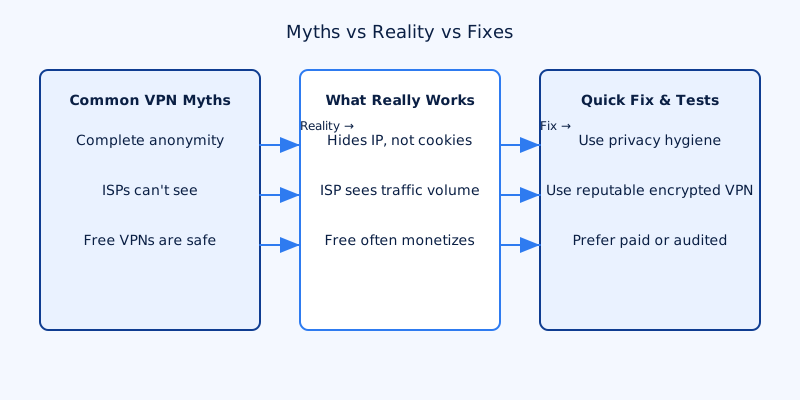
VPN myths persist because providers, headlines and well‑meaning users compress a technical tool into simple slogans. That simplification is useful for marketing and quick tips, but it creates dangerous misunderstandings about what a VPN actually protects — and what it does not. This article focuses on practical truth, not scare tactics: precise realities, why they matter for your privacy and security, and clear fixes you can apply today.
How to use this guide: each myth below is followed by the reality, why that reality matters, and a short test or fix you can do immediately. Skim the myths if you already know some answers, or read straight through if you want a compact, actionable primer.
What you'll learn: when a VPN helps, what it doesn't protect, how to verify a provider's claims, and a hands‑on checklist to avoid the most common mistakes. If you search for "vpn myths debunked," this is the practical guide you want — not slogans, but steps you can take.
10 VPN myths — brief debunks and quick fixes
Myth: A VPN makes you completely anonymous
Reality: A VPN hides your IP address from the sites you visit and from anyone watching your local network, but it does not erase cookies, account logins, browser fingerprints or other identifiers that tie activity back to you.
Why it matters: If you sign into services or keep persistent identifiers in your browser, those services can still associate activity with your identity even when your IP changes.
Quick fix: Combine a VPN with privacy hygiene: log out of accounts, use private/incognito windows, clear cookies when needed, or use separate browser profiles/containers for different identities. For stronger anonymity in threat models that demand it, consider combining a VPN with Tor or using Tor alone.
Myth: VPNs hide all your activity from your ISP
Reality: Your ISP can still see that you have an encrypted connection to a VPN server and can measure traffic volume, timing and destination IP of the VPN server. They do not see the contents of encrypted traffic or the websites you visit beyond the VPN endpoint.
Why it matters: Metadata (who you connect to, how much you transfer, when) can be useful to third parties even without payload contents. Some ISPs apply different rules based on this metadata.
Quick fix: Use a reputable, encrypted VPN service and be aware that metadata exposure is reduced but not eliminated. If you need to hide the fact you use a VPN in restrictive jurisdictions, follow provider guidance and legal advice for that region.
Myth: "No‑logs" means no one can ever tie activity to you
Reality: "No‑logs" is an unstandardized marketing term. Providers interpret it differently, and legal compulsion or poor practices can force or cause logs to exist.
Why it matters: If a provider keeps connection timestamps, IP assignments or other records, those can be used to link activity to a customer when requested by authorities.
Quick fix: Prefer providers with independent audits, published transparency reports or warrant canaries. Read the privacy policy carefully to see what is and isn’t logged, and check whether independent firms have reviewed the provider's claims.
Myth: Free VPNs are perfectly safe
Reality: Many free VPNs monetize their users through advertising, data collection, injected trackers or throttled connections. Some free tiers are perfectly legitimate; many are not.
Why it matters: A free service that retains or sells metadata defeats the privacy purpose of using a VPN in the first place.
Quick fix: Read the privacy policy, look up corporate ownership, and prefer paid providers or well‑audited free tiers. If you must use a free VPN, avoid sending sensitive data while connected and treat the service with caution.
Myth: A VPN will make your internet faster
Reality: Encryption and routing through a remote server add overhead, so a VPN usually reduces throughput and increases latency. In rare cases — for example, when an ISP intentionally throttles specific traffic types — routing through a VPN can appear faster.
Why it matters: Expect some performance cost. Picking the wrong server or protocol can make the hit worse.
Quick fix: Run controlled speed tests with and without the VPN, use modern protocols such as WireGuard or recent OpenVPN builds, and choose a geographically close server for lower latency.
Myth: Hosting your own VPN is always more private
Reality: Self‑hosting removes a commercial third party but exposes a single public IP (your home or cloud host) and requires you to maintain security patches, logs and monitoring. A poorly configured self‑host can leak more than a commercial provider.
Why it matters: Self‑hosting is a tradeoff: you control the endpoint and the logs, but you also become the weak link if you lack the operational security to run a hardened service.
Quick fix: Choose self‑hosting for specific, well‑defined needs (private access to a home network, controlled tunnels). If your goal is broader anonymity-at-scale, consider a reputable commercial provider instead.
Myth: VPNs protect you from malware and phishing
Reality: VPNs encrypt traffic but do not inspect or block malicious content on your device; they won't stop downloads, credential theft, or deceptive sites unless the provider offers optional, explicit filtering services.
Why it matters: Assuming a VPN is a security suite leads to risky behaviour: clicking links, ignoring software updates or reusing passwords while believing you're protected.
Quick fix: Use endpoint protections — antivirus, browser anti‑phishing features, 2FA and a password manager — alongside your VPN.
Myth: Sites can't track you if you're on a VPN
Reality: Sites track with cookies, login sessions and browser fingerprinting. A VPN changes the apparent IP address but not those persistent identifiers unless you take steps to remove or isolate them.
Why it matters: For privacy between sessions, cookies and fingerprints matter as much as IP addresses. A VPN alone won't prevent long‑term tracking.
Quick fix: Clear cookies, use browser containers or privacy‑focused browsers, and avoid signing into services when anonymity is required.
Myth: A VPN shields me from legal consequences when torrenting
Reality: VPNs can reduce direct ISP visibility, but they do not guarantee immunity. Providers may log, be compelled to share records, or cooperate with rights holders depending on jurisdiction and policy.
Why it matters: Relying on a VPN as a legal shield is risky. Different providers and countries handle requests differently.
Quick fix: Check your provider's P2P policy, look for independent audits or transparency reports, and understand local laws before engaging in copyright‑sensitive activity.
Myth: VPNs are illegal
Reality: In most countries, using a VPN is legal. A small number of jurisdictions restrict or regulate VPN use.
Why it matters: Breaking local laws can have serious consequences, regardless of technology used.
Quick fix: Check local laws and the provider's guidance for restricted countries before using a VPN in those places.
How to verify a VPN's claims
Claims mean very little without verification. Here are practical checks you can run yourself or use to evaluate a vendor.
- Run leak tests. Connect to the VPN and visit an IP/DNS/WebRTC leak test site to confirm the reported IP is the VPN server, DNS requests resolve through the VPN, and the browser isn't leaking a local IP via WebRTC.
- Test the kill switch. Enable it, start a file transfer or streaming session, then disable your network adapter or unplug Ethernet/Wi‑Fi. Confirm network activity stops immediately. If it does not, the kill switch is not functioning correctly.
- Measure speeds. Use
speedtest.netor equivalent to compare performance with and without the VPN. Repeat tests at different times and with different servers to evaluate consistency. - Check transparency. Look for independent audits, court cases or transparency reports. Read the privacy policy to see what the provider explicitly logs and for how long.
- Verify ownership and jurisdiction. Research corporate ownership, parent companies and where the provider is based — local laws determine how authorities can compel data.
- Review payment and support. Anonymous payment options and prompt support are good signals but not guarantees; they're part of a broader trust picture.
When a VPN actually helps — realistic scenarios
Use a VPN when the threat model matches what a VPN protects:
- Safe use on public Wi‑Fi: A VPN encrypts the link between your device and the VPN server, preventing local attackers on the same network from reading unencrypted traffic.
- Geo‑restricted content and remote access: A VPN can give you an IP address in another region or connect securely to home/office networks for remote access.
- Avoiding ISP throttling: If your ISP throttles specific traffic types, a VPN may conceal that traffic pattern and reduce throttling in practice — results vary.
- Protecting IP privacy: Hiding your device IP helps against doxxing, some forms of targeted ads and simple IP‑based blocking.
Remember: a VPN is not a substitute for endpoint security, browser privacy measures or sensible online behaviour.
Self‑hosted vs commercial vs free: tradeoffs to weigh
Think in terms of threat model, operational capacity and trust.
Self‑hosted: You control the server and logs but expose a single public IP and must handle hardening, updates, monitoring and potential legal exposure. Self‑hosting suits specific use cases (secure remote access to home devices, custom routing) rather than broad anonymity.
Commercial paid VPNs: They offer server diversity, ease of use and customer support. They require trust in the provider’s policies, audits and jurisdiction. Look for clear, public documentation from the vendor.
Free VPNs: Common revenue paths include ads, telemetry collection, or bandwidth limits. Use free services cautiously and read the privacy policy.
How to judge a vendor: prefer transparency — independent audits, a clear privacy policy, and public information about ownership and jurisdiction. Strong protocol support (for example, WireGuard) and reasonable logging limits are also important. VPN4All, for example, publishes clear policies to help users evaluate trust, but evaluate every provider against the checks above.
Hybrid approach: Some users mix self‑hosting for private tunnels and a commercial provider for anonymity‑at‑scale. Choose what fits your threat model and technical skillset.
Practical checklist: configure your VPN the right way
- Enable and test the kill switch. Verify it stops traffic when the VPN disconnects.
- Set the VPN to start on boot for devices you want always protected (laptops used on public Wi‑Fi, for example).
- Choose modern protocols: use
WireGuardor up‑to‑dateOpenVPNbuilds for a balance of performance and security. - Pick nearby servers for lower latency and better performance unless you need a specific country exit IP.
- Run IP/DNS/WebRTC leak tests after setup and after major updates or OS changes.
- Combine with endpoint protections: keep OS and apps updated, use antivirus/anti‑phishing, enable 2FA and use a password manager.
- Mind browser privacy: clear cookies when needed, use containerised browsing for separate identities, and install privacy extensions with care.
- Keep backup plans: know how to reach support, have alternate networks, and document how to disable the VPN if it blocks essential services.
Debunking VPN myths is about matching tool to threat. A VPN is straightforward and useful when deployed correctly and combined with other protections. Run the simple tests above, read policies closely, and configure your software so it behaves the way you expect. If you want a privacy‑focused provider, evaluate transparency, audits and jurisdiction — then verify with hands‑on tests rather than marketing claims.