Quick pre‑subscribe checklist
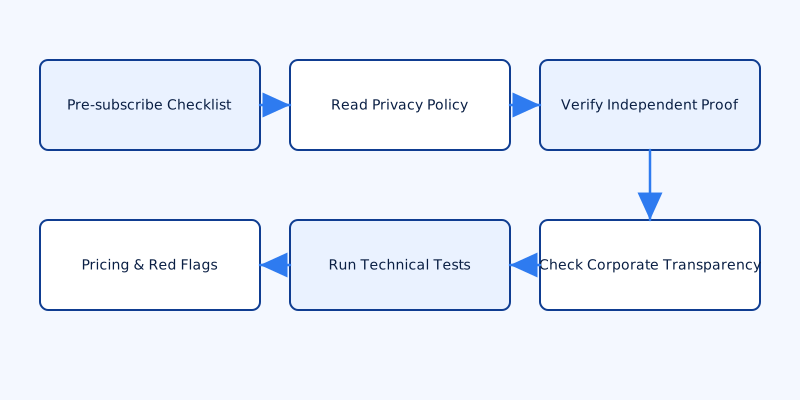
Before you hand over money or personal details, do a quick structured scan of the provider’s public pages. This answers the practical question of how to tell if a VPN is trustworthy within a few minutes.
Look for three core things up front: a clear no‑logs policy, evidence of independent audits, and a stated legal jurisdiction. If any of those are missing or nebulous, slow down. Also confirm payment options — anonymous methods like crypto or gift cards are a privacy plus — and whether there's a free trial or a money‑back guarantee so you can test without commitment.
Check technical features next. A trustworthy provider will advertise concrete technologies: WireGuard or OpenVPN, strong ciphers such as AES‑256 or ChaCha20, and client safeguards like a kill switch and leak protection (DNS and IPv6). Those are minimum baseline capabilities, not marketing fluff.
Finally, watch for obvious red flags: broad promises without detail, no company information or way to contact a legal entity, and aggressive upsells that try to convert a “free” plan into paid products by obscuring what the free tier actually does. If a landing page is all slogans and no specifics, treat it as suspect.
Read the privacy policy and logging claims closely
Buzzwords like “we don’t log” are marketing. You need precise language. Open the privacy policy and search for the exact terms that reveal what a provider actually records: retain, timestamp, IP, connection, share. Those words often point to the places where a provider admits to storing metadata or to conditions under which data might be disclosed.
What to look for in plain terms:
- Connection metadata vs activity — Activity means the content of communications or the URLs you visit. Connection metadata means who connected when, to which server, for how long, and possibly the originating IP. A provider that logs connection metadata is not equivalent to one that logs activity.
- Retention periods — If connection timestamps or IPs are stored, how long? “Short period” is vague; a specific number of days is explicit.
- Data sharing clauses — Terms that allow sharing with “partners,” “service providers,” “advertisers,” or “analytics vendors” are risky if telemetry is not explicitly limited. Look for whether data is shared in identifiable form or only aggregated/anonymous.
If the privacy policy contradicts marketing — for example a “no logs” claim on the marketing page but a privacy policy that permits storage of timestamps or IPs — treat the marketing claim as unverified. Don’t accept “we don’t log” at face value without matching contract language.
Verify independent proof: audits, open source and server setup
Independent proof matters, but audits are only as useful as their scope and transparency. When a provider claims an audit, find the actual report, not a one‑page summary. Check:
- Who performed the audit (reputable security firms vs unknown vendors).
- The audit date. Old audits don’t reflect current software or infrastructure.
- Which components were reviewed — client apps only, or backend systems and server deployments as well.
- Whether the provider published remediation notes for issues found.
Prefer providers that publish full reports and post follow‑up remediation. A short press release saying “we were audited” is weaker evidence than a detailed PDF showing findings and fixes.
Server architecture is a separate technical trust factor. Providers that run RAM‑only or diskless servers significantly reduce the risk of persistent logs because data does not survive a reboot. Look for operator statements or architecture documents that explain whether servers are ephemeral, how routing is handled, and whether keys are rotated. If a provider won’t explain the server model, assume less transparency.
Open‑source clients, public repositories and active bug‑bounty programs increase auditability. If code is on GitHub, check recent commits and issue activity — a real, active project typically has ongoing maintenance and community reports. If the code is closed and the provider refuses to share details, you have to rely solely on third‑party audits and their scope.
Corporate transparency: ownership, jurisdiction and incident history
Who legally controls the service matters. Identify the company behind the brand, its legal domicile and any parent companies. Obscured ownership, convoluted holding companies or anonymous registrants are red flags because they reduce accountability.
Jurisdiction affects how the company responds to law enforcement requests. Local laws on data retention, national security letters, and treaties such as mutual legal assistance agreements (MLATs) can require disclosure or complicate resistance to requests. A jurisdiction alone isn’t proof of bad intent, but it’s a risk factor to weigh alongside technical controls (like RAM‑only servers).
Look for transparency reports, published court orders or documented incident responses. Honest providers publish how they handled past requests or breaches and the limits of what they could disclose. Community sources — security blogs, GitHub issue threads, Reddit discussions — can surface stories, but verify claims with primary documents before drawing conclusions.
Technical tests you can run (before or during a trial)
You don’t need to be an expert to run useful tests. Start with public web tests: ipleak.net and dnsleaktest.com show DNS and IP exposure; browser WebRTC leak checks detect whether your browser reveals a local IP. Test on multiple devices and networks (home Wi‑Fi, mobile data) to see consistent behavior.
To test the kill switch, use the simplest approach: start an active VPN session and then disable the network (unplug Ethernet or toggle Wi‑Fi off). Watch whether your IP/DNS reverts to your ISP — if it does, the kill switch failed. Some clients have a “block until VPN is up” option you can enable and test repeatedly.
Compare speed and latency against your baseline (without VPN) using repeatable speed tests. Inconsistent performance, large latency spikes, or frequent re‑routing can indicate overloaded servers or poor network design.
If you’re comfortable with packet captures, use Wireshark or tcpdump to inspect traffic origin. A simple command on a desktop test might be:
sudo tcpdump -i any -n host 8.8.8.8
That lets you observe whether any traffic bypasses the tunnel or whether the client makes unexpected external connections (telemetry). On mobile, check app permissions and use network capture tools available on desktop tethering or via a routed test device. Inspect APK manifests or use an APK analyzer to check for bundled analytics SDKs and excessive permissions.
Free VPNs, pricing models and clear red flags
Free VPN offerings are attractive but often monetized in ways that compromise privacy: ads, embedded analytics SDKs, selling bandwidth to third parties, or selling aggregated — sometimes deanonymizable — usage data. Ask how the service funds infrastructure and whether free tiers are subsidized by advertising or data sales.
Prefer subscription models with transparent pricing and clear refund terms. Anonymous payment options such as crypto or gift cards are a privacy plus and show the provider understands user needs, but they’re not in themselves proof of trustworthiness.
Red flags to watch for:
- Apps that request excessive permissions (contacts, SMS) with no explained reason.
- Closed apps with known tracking SDKs bundled; inspect manifests or APKs where you can.
- Vague audit claims or no published reports for a provider that loudly markets security.
- Ownership or location hidden behind opaque shell companies.
- “Free” plans that constantly push upgrades via aggressive in‑app messaging or that limit core privacy features to paid tiers only.
If you suspect the provider isn’t trustworthy after testing: cancel the subscription, request a refund if applicable, revoke any saved credentials, and rotate passwords for accounts you accessed while connected. Report your findings to privacy communities and, if you see illegal behavior, to the appropriate authorities. Sharing verifiable details helps others, but avoid spreading unverified allegations.
How to tell if a VPN is trustworthy is a practical process, not a single checklist item. Combine documented policies, independent technical proof, corporate transparency and hands‑on testing. When those elements align — explicit no‑logs language consistent with the privacy policy, full audit reports, ephemeral server architecture, open code or active bug reporting, and predictable client behavior in tests — you have reasonable grounds to trust a provider. When they don't align, assume risk and either continue testing with a refundable trial or look elsewhere.