Why MFA changes the VPN threat model
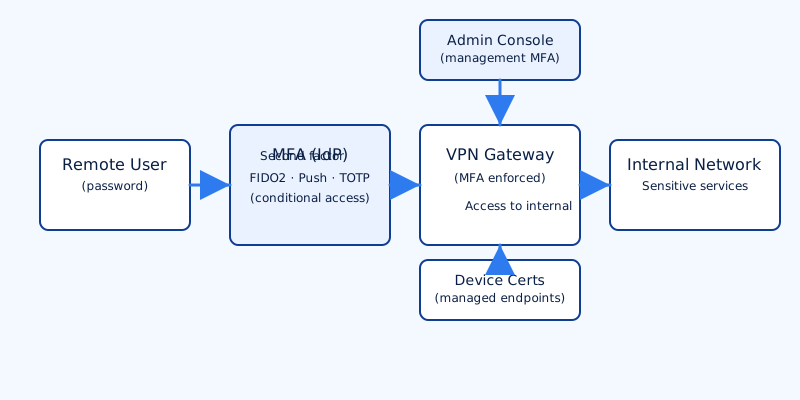
VPN accounts are high-value targets. With a valid VPN login an attacker can appear to be an internal user, reach internal services that aren’t exposed to the public internet, pivot between systems, and access sensitive data or administrative consoles. That makes VPN credentials a single point of failure if you rely on passwords alone.
Single-factor authentication — a username and password — is vulnerable in multiple, well-known ways: passwords get phished, they leak from other breached services, and users reuse or choose weak passwords that succumb to credential stuffing and brute force. Once an attacker has a password, the attacker has the same level of access as the legitimate user.
MFA for VPN changes that threat model by inserting a second, independent trust barrier. Even if an attacker acquires a password, a second factor (something you have or something you are) is usually required to complete authentication. That doesn’t make an account invulnerable, but it forces attackers to obtain an additional secret or device and greatly raises the cost and complexity of a successful breach.
Real-world VPN breaches MFA helps prevent (and its limits)
MFA significantly reduces risk in common attack scenarios:
- Credential-based attacks: phishing, credential stuffing and automated brute-force attacks become much harder. With a second factor, stolen passwords alone rarely allow access.
- Lateral movement prevention: an attacker who obtains a VPN login from a breached web service or a phishing campaign cannot easily reuse that login to reach internal systems without the second factor.
- Supply-chain or third-party credential leaks: leaked passwords from other services are less likely to be useful when MFA is enforced on the VPN.
But understand the limits. MFA does not solve every risk:
- Device compromise: if an attacker already controls a trusted device, they may be able to use saved sessions, harvested cookies, or installed malware to authenticate and bypass user prompts. Endpoint security remains essential.
- Active session hijacking: an attacker who steals a live, authenticated session token or otherwise hijacks an established connection can bypass MFA because the authentication step already happened.
- Management-layer exposure: some VPN systems use key-pairs (for example,
WireGuard) for the tunnel itself but still provide web or portal management where accounts are controlled. MFA matters at the management and user-account layers even when the underlying protocol uses keys.
Protocol notes: WireGuard uses public/private key pairs for the tunnel, so the immediate tunnel auth is based on keys, not usernames; still, the administration and onboarding portals that issue those keys must be protected with MFA. OpenVPN commonly authenticates with username/password and integrates readily with external MFA systems, so enabling MFA directly changes the tunnel authentication step.
Which MFA methods work best for VPNs
Not all second factors are equal. Choose methods that match risk and operational realities.
Hardware security keys (FIDO2/WebAuthn) — these provide the strongest protection against phishing and remote attacks. A hardware key requires possession and, in many cases, user presence. For administrators and high-risk users, enforce FIDO2 keys. They resist the common trick of stealing a password and then intercepting a push.
Push-based authenticators — widely used because they are simple for users. A push notification to a phone is convenient, and when combined with device attestation it can be strong. Be mindful of prompt‑bombing (repeated prompts hoping for an accidental approval); choose an authenticator that shows contextual information and requires an explicit action.
TOTP apps (time-based one-time passwords) — apps like standard authenticators are broadly compatible and work offline. They’re a solid default for many users; protect TOTP seeds as you would any secret and document backup/transfer procedures so users don’t get locked out.
Client certificates / device-based authentication — issued by your PKI and installed on managed endpoints, these are useful for Always‑On VPNs and auto-connect scenarios. They authenticate a device, not a user, so pair them with user MFA at sign-in. Device certificates are excellent for enforcing managed device posture, but they shouldn’t replace user-level MFA.
Avoid SMS whenever possible. SMS-based OTPs are vulnerable to SIM swap and interception. Use SMS only as a last-resort recovery channel, and monitor recovery flows closely.
How to integrate MFA into your VPN stack
There are three common integration patterns to add MFA for VPN access:
RADIUS/LDAP + MFA gateway — many VPNs authenticate against a RADIUS server. You can place an MFA gateway in front of RADIUS (or configure your RADIUS to forward auth requests to an MFA provider). This approach works with legacy VPN appliances that don’t understand modern protocols.
SAML/OIDC via an identity provider (IdP) — modern VPN solutions can act as SAML or OIDC service providers. Delegating auth to an IdP gives you centralized control and lets you reuse your corporate MFA policies. This is the cleanest route if your IdP supports FIDO2, push tokens, and conditional access.
Native VPN vendor MFA hooks — some VPN vendors provide built-in integrations to multiple MFA methods. Check vendor capabilities, but prefer standards-based integration so you can change providers without reworking your whole auth stack.
Use conditional access to reduce friction while maintaining security. Require MFA from risky locations, unfamiliar devices, or for elevated privileges; allow lower-friction access for low-risk patterns. Conditional access policies are most effective when they combine signals: geo-location, device posture, network, and user behavior.
Always‑On VPN and managed devices: for corporate laptops you typically combine device certificates and endpoint posture checks (antivirus, disk encryption, OS version) with user MFA at sign-in. That gives automated connectivity while preserving strong user authentication when sessions start or when a policy change requires reauthentication.
When evaluating providers, confirm they support your chosen IdP, FIDO2 keys, or push tokens. Test the full lifecycle: initial enrollment, device loss, transfer of a key, and emergency recovery so the flow is workable under pressure.
Rollout checklist for admins and power users
Deploying MFA for VPN requires planning. Here’s a practical checklist you can adapt:
- Pilot with a small, representative group (IT staff, remote workers). Collect UX feedback and log failure modes.
- Define backup and recovery: require at least one secondary authenticator (hardware key, TOTP app, or emergency codes). Publish clear, short recovery steps and require strict helpdesk verification for resets.
- Enforce device registration and endpoint posture for managed endpoints. Use device certificates and ensure revoked devices are blocked quickly.
- Log and alert on abnormal MFA failures or bypass attempts. Correlate failed MFA attempts with IP/geolocation, user behavior, and recent admin actions.
- Train users: show how to register hardware keys, transfer TOTP seeds, and recognize phishing and prompt‑bombing. Keep guides short and task-oriented.
- Document admin procedures for lost keys, revoked certificates, and emergency access — and test them before you need them.
Common pitfalls, active attacks and how to harden
Knowing likely attacks helps you design mitigations.
Prompt‑bombing is when attackers send repeated push notifications hoping the user approves one out of annoyance. Mitigations: require explicit user action (such as pressing a hardware key or approving within an app that shows context), implement rate limiting on push prompts, and block repeated failures from the same IP range.
Compromised IdP or recovery channels — if your identity provider is breached or recovery options (email, SMS) are weak, attackers can bypass MFA indirectly. Protect IdP admin accounts with the same or stronger MFA methods, monitor for unusual admin actions, require short, auditable approval workflows for changes, and limit recovery channel use.
Misused backup codes — treat backup codes like passwords. Store them securely, rotate after use, and require re-registration of second factors after suspicious activity. Avoid emailing backup codes; provide them via secure, ephemeral download or printed instruction when strictly necessary.
Logging and monitoring — collect detailed authentication logs: successful and failed MFA attempts, factor type used, IPs, devices, and timestamps. Correlate failed MFA attempts with account lockouts, high-volume prompt failures, or geographic anomalies and raise alerts. Logs are invaluable both for detecting active attacks and for triage during incidents.
Finally, combine technical controls with good operational hygiene. MFA for VPN greatly reduces risk, but it should be one layer in a defense-in-depth strategy that includes endpoint protection, least-privilege network segmentation, strong logging, and tested incident response procedures.
Practical next steps
If you don’t have MFA on your VPN yet: pick a pilot group, choose a primary method (hardware keys for admins; TOTP or push for general staff), configure your IdP or RADIUS gateway, and enforce a secondary method for recovery. If you already use MFA, review your policies for prompt‑bombing protections, recovery flows, and logging. Check whether your VPN vendor or IdP supports FIDO2 and conditional access — if they don’t, plan how to migrate to a stack that does.
Implementing MFA for VPN is not a checkbox. It’s a change in how you authenticate and how you detect and respond to abuse. Done well, it converts a common single point of failure into a resilient, auditable control that meaningfully reduces your exposure to credential-based breaches.