What a VPN kill switch actually does
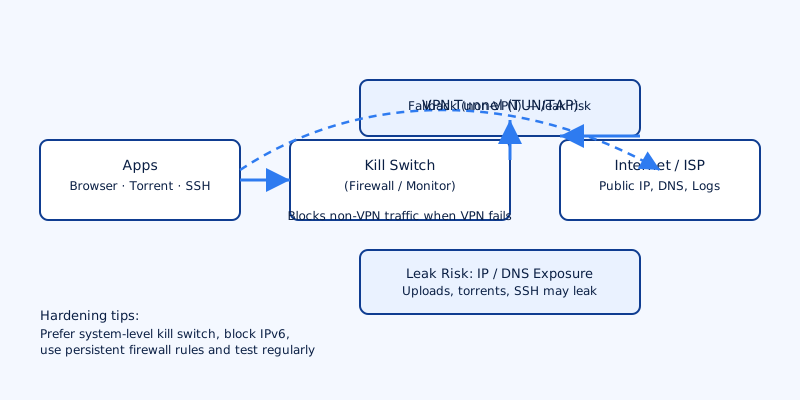
A vpn kill switch is a small but critical safety mechanism built into many VPN clients. Its job is simple: continuously monitor the VPN connection and block or reroute traffic if that connection fails, preventing your real IP address, DNS requests and other traffic from leaking onto the normal network path.
Two common implementations exist:
- App-level kill switch: The VPN client blocks network access only for the applications it manages. If the app exits or the system routing changes, other programs may still use the regular network.
- System-level kill switch: The client or accompanying firewall rules block all non-VPN network traffic on the device. This protects every application until the VPN is restored.
Why it matters: VPN connections sometimes drop for short intervals—seconds or less—when the network changes, the VPN service restarts, or a driver crashes. Even these brief gaps can expose your true IP and DNS queries to your ISP, network operator or any third party observing the path. A kill switch reduces or eliminates this exposure by denying traffic outside the VPN tunnel.
What happens when a VPN drops mid-session
When a VPN drops without a kill switch in place, the operating system reverts to its default network path. The immediate effects are predictable:
- Your public IP address becomes the one assigned by the local network or ISP.
- DNS lookups go to whatever resolver is configured on the system or provided by the local network, which can reveal visited hostnames.
- Ongoing TCP/UDP sessions (web uploads, downloads, torrents, SSH, video streams) may continue over the ISP connection, potentially exposing the activity and identity tied to that device.
Session-specific risks are real. A large file upload or a BitTorrent swarm that began under the VPN can continue on the unprotected link, associating your real IP with that traffic. Interactive sessions like SSH or RDP may also reconnect over the real network, revealing the client's identity and any unencrypted data.
From an evidence or forensics perspective, even a brief exposure can be logged by websites, CDNs or your ISP. Whether that data is accessible to law enforcement depends on local laws, retention policies and the logging behavior of those services. A kill switch reduces the chance that those logs will contain your real IP or unprotected DNS queries.
How kill switches work under the hood
There are two technical approaches commonly used to implement a vpn kill switch: firewall-based blocking and interface/route monitoring.
Firewall-based approaches install deny rules that prevent any traffic outside the VPN interface. On Linux that typically means iptables or nftables rules that allow traffic on lo and on the VPN device (for example tun0 or wg0) and drop everything else. On Windows, the client creates rules using the Windows Filtering Platform (WFP). macOS implementations can use the Packet Filter (pf) to enforce blocking.
Interface and route monitoring watches the VPN network interface or the system's default route. When the client detects the TUN/TAP interface has gone away, or the default route changed away from the tunnel, it immediately removes or modifies routes so traffic cannot flow outside the tunnel.
Both approaches have limits. The critical problem is timing: if the VPN process crashes or the route changes faster than the client can install blocking rules, there is a window when traffic can leak. Well-designed solutions try to make rule changes atomic and persistent so the race window is effectively eliminated, but this requires privileged code and careful implementation.
Platform differences and common pitfalls
Not all platforms make it equally easy to enforce a kill switch. Details matter.
- Windows: Many VPN apps use WFP to implement system-level blocking. This is robust when drivers and permissions function correctly. However, major OS updates or driver conflicts can break WFP rules; permissions changes can prevent the client from reapplying rules after a crash.
- macOS: Implementations usually rely on
pfor the VPN client’s internal controls. Some GUI clients offer a kill switch, but macOS changes have occasionally required updates to maintain complete control of traffic. On some macOS releases an app-level switch will not block all system traffic. - Linux: Tools like WireGuard do not include a kill switch by design. You need explicit firewall rules that allow only traffic over the WireGuard interface or scripts tied to OpenVPN’s
--up/--downhooks to manage rules. Distribution packaging, NetworkManager or systemd-networkd behavior can complicate this. - Android: Android supports an “Always-on VPN” mode and a “block connections without VPN” option. When enabled, these are effective, but correct behavior can depend on the VPN implementation and Android version.
- iOS: Apple’s sandboxing and VPN APIs are more restrictive. Many clients can only enforce app-level protections or use the per-app VPN feature; full system-level blocking is harder to guarantee.
- Browser extensions and split-tunneling: Browser extensions cannot control system traffic. Split tunneling—letting certain apps bypass the VPN—creates intentional exceptions that can defeat kill-switch goals if misconfigured.
How to test and verify your kill switch
Testing is the only reliable way to know whether a vpn kill switch behaves as intended. Follow these steps:
- Connect the VPN and confirm your IP appears changed using an IP-checking site or service.
- Deliberate disconnect: stop the VPN app or kill its process. Observe whether internet access is blocked immediately. A system-level kill switch should leave you with no working connections outside the VPN; an app-level switch will only stop the managed app(s).
- Leak tests: use IP/DNS/IPv6 leak checking pages and WebRTC checks while connecting, disconnecting, and simulating crashes. Pay attention to DNS server addresses and any unexpected IPv6 addresses.
- Advanced checks: monitor active network connections and packets. Tools like
tcpdumpor Wireshark can show whether unencrypted packets leave the device and what interface they use. A simple filter can show traffic not bound for the VPN server IPs. - Test application behaviour: start a large download, a torrent client or an SSH session and then forcibly kill the VPN. Confirm these activities do not resume over the ISP connection.
Run these tests after OS updates or after updating your VPN client, since system-level changes can break previously reliable behavior.
Hardening tips and practical configuration advice
Implementing a vpn kill switch is as much about configuration discipline as it is about technology. The following practices reduce the chance of accidental leaks.
- Prefer system-wide/permanent kill switches when your threat model includes full-device anonymity or protection for all apps. App-level switches are suitable when you only need to protect specific programs.
- Explicitly handle IPv6. Many kill switches only cover IPv4 by default; if your ISP provides IPv6 and your client doesn’t block it, DNS or IP leaks can still occur. Either disable IPv6 system-wide or ensure the VPN client blocks IPv6 traffic as well.
- Use firewall rules that persist across reboots and that are applied as early as possible during startup. On Linux that can mean placing rules in networking init scripts or using systemd units. On Windows, ensure WFP rules are installed and re-applied automatically.
- Implement atomic route changes where possible. Remove the default route only after the VPN route is in place, and vice versa. Many clients handle this, but custom setups should script the order carefully.
- Avoid split tunneling for sensitive apps. If anonymous activity is required, do not allow exceptions that bypass the tunnel.
- Enable auto-reconnect so the client attempts to re-establish the tunnel immediately. Combined with a persistent kill switch, this minimizes downtime and exposure.
- Test after updates. OS upgrades and client updates are the most common cause of regressions. Redo the verification steps after any change.
- Audit provider settings. Check whether the VPN client exposes options for a system-level kill switch and IPv6 handling. For example, VPN4All’s apps provide a system-level kill switch and configurable IPv6 handling that you can enable in settings to maintain protection across interfaces and reboots.
A vpn kill switch is a simple concept with real-world consequences. When properly implemented and tested, it prevents the most common leaks that happen when a tunnel drops. When misconfigured or absent, even a few seconds of exposure can reveal activity and identity. Configure system-level protections where you need comprehensive coverage, explicitly handle IPv6, and test regularly—especially after updates—to keep the kill switch serving its purpose.