How double VPN works: the tunnel-inside-a-tunnel
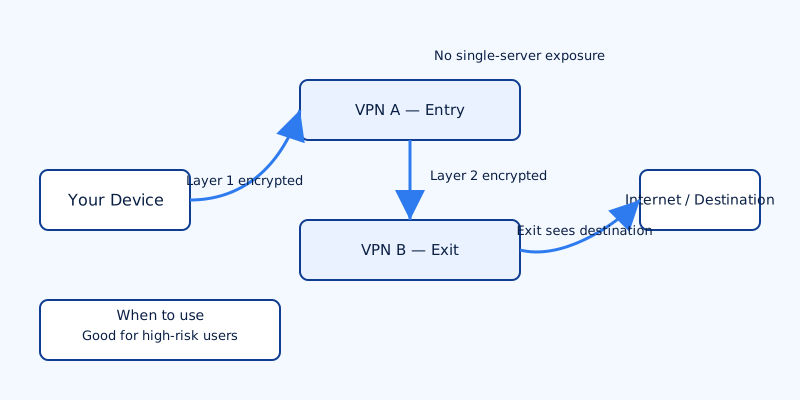
If you ask "what is double VPN" in the simplest terms: it’s two VPN hops chained in sequence so your traffic passes through two separate servers before reaching the internet. Conceptually it’s a tunnel inside a tunnel. The client encrypts your traffic, sends it to VPN server A, which decrypts and forwards the traffic to VPN server B inside a second encrypted tunnel, and VPN server B sends the final packets to their destination.
Broken down into a step sequence:
- Client → VPN A: Your device establishes an encrypted connection to the first VPN server.
- VPN A → VPN B: VPN A creates an encrypted link to the second VPN server and forwards your traffic into it.
- VPN B → Internet: VPN B exits to the public internet; services you contact see VPN B’s IP address, not your real IP.
Each hop applies an encryption layer, so packets are effectively encrypted twice while traversing the network between you and the exit server. An important privacy property is that no single intermediate server sees both your real IP and the final destination — VPN A sees your real IP and the IP of VPN B, while VPN B sees the destination and VPN A’s IP, but not your real IP directly.
There are two common implementation models. Many commercial services offer provider-managed multi-hop (also called built-in double VPN or multi-hop) where the provider controls both hops and offers a single client toggle to enable it. The other option is manual chaining: running two VPN clients in series (or using a virtual machine/router to forward traffic between clients). Manual chaining gives you more control but is harder to configure and troubleshoot.
Privacy and security benefits (and their limits)
Double VPN provides concrete privacy benefits in specific threat scenarios, but it is not a silver bullet.
What it buys you:
- Reduced single-point exposure: If one VPN server is compromised or compelled to log traffic, it won’t by itself reveal both your identity and the destination of your traffic. That separation raises the difficulty and cost for an attacker seeking to link you to specific activity.
- Metadata protection from a single provider: The exit server cannot directly map your real IP to the destination — an improvement over single-hop setups where the exit provider could correlate these two pieces of information.
What it does not do:
- It does not make application-layer content invisible to the exit node. If a site uses plain HTTP, the exit server still sees unencrypted content. Double VPN does not replace end-to-end encryption like HTTPS.
- It is not foolproof against global adversaries. An attacker with access to multiple network vantage points — for example, a nation-state able to monitor large parts of the internet backbone — can still perform timing and traffic-correlation attacks to link the hops.
- It does not fix client-side leaks. If your device exposes identifying data via DNS leaks, WebRTC, or malicious extensions, double-hop routing alone won’t remove those leaks.
In short: double VPN increases the cost and complexity for someone trying to deanonymize you, and it reduces the risk from a single compromised server. Whether those protections matter depends on your threat model.
Practical downsides: speed, complexity and compatibility
Double encryption and an extra network leg are not free. Expect measurable performance impacts and increased complexity.
Performance and resource costs:
- Slower throughput and higher latency: Two layers of encryption and routing through an extra server add CPU work and network hops, which means lower speeds and greater latency compared with a single-hop VPN.
- Battery and CPU use: On mobile devices, double encryption increases processor load and drains battery faster. Devices with weaker CPUs will show a bigger performance hit.
Compatibility and operational issues:
- Latency-sensitive applications such as online gaming, VoIP, or real-time trading may perform poorly or fail under double-hop conditions.
- Some services and streaming platforms block or throttle traffic from known multi-hop or datacenter IPs; you may encounter connection problems.
- P2P and port forwarding can be more complicated to set up, and provider policies may prohibit or restrict multi-hop use for certain protocols.
- Troubleshooting is harder. When something breaks you must distinguish whether the issue is at the client, the first hop, or the second hop; manual tools for testing intermediate hops aren’t always available unless the provider exposes them.
When double VPN is worth using — real-world scenarios
Double VPN is a tool with a narrow, well-defined set of use cases. It excels when the extra layer meaningfully mitigates a plausible threat.
Use double VPN when:
- You are a high-risk user: journalists, human-rights activists, researchers, or legal professionals operating under hostile monitoring who need extra separation between their network origin and online activities.
- You explicitly distrust either your local network operator or the exit VPN server and want to avoid putting all trust in a single party.
- You need plausible deniability against limited server compromise — for example, reducing the usefulness of logs from a single compromised server.
Avoid double VPN for routine activities. For everyday browsing, banking, and streaming, a reputable single-hop VPN combined with strict client-side security (HTTPS Everywhere, secure browser settings, DNS leak protection) offers better performance with adequate privacy for most users. Double VPN can be overkill unless your threat model justifies the trade-offs.
When evaluating a provider for multi-hop use, consider jurisdiction, logging policy, and whether the provider discloses how hop chains are created. Transparency about whether hops are owned by the same legal entity and whether the provider ever keeps metadata about hop linkage is important.
Alternatives and comparisons (Tor, Onion over VPN, cascades)
Double VPN sits on a spectrum of tools that trade anonymity, performance, and usability. Understanding the differences helps you choose the right tool for the situation.
Tor:
Tor provides strong anonymity by routing traffic through multiple volunteer-operated relays with layered encryption (the onion model). Against a single-provider compromise, Tor is more robust because no central provider owns the full path. However, Tor is typically slower than even double VPN and many sites block Tor exit nodes.
Onion over VPN (VPN → Tor):
Running your VPN to a Tor gateway gives you the convenience of a single authenticated hop to your VPN provider while gaining access to the Tor network afterward. It’s useful when you need to access .onion services or want Tor’s anonymity properties while hiding your Tor usage from your ISP. Expect additional latency and complexity with limited benefit for performance-sensitive tasks.
Cascades / chained VPN clients:
Manually chaining multiple VPN clients or using multiple separate VPN providers in sequence gives you more control over the exact hops and jurisdictions involved. The downside is configuration complexity and a greater chance of misconfiguration and leaks. Built-in provider multi-hop is easier but requires trust that the provider correctly implements and documents the hops.
Choose based on threat model: if your main risk is a single untrusted VPN provider, multi-hop or Tor makes sense. If you need speed, a single reputable VPN is better.
How to set up and test double VPN on devices (quick checklist)
Below is a practical checklist for setting up and verifying double VPN. It assumes you use a provider that offers built-in multi-hop; manual chaining requires additional networking steps and careful leak protection.
- Pick the right implementation: Prefer a provider with built-in multi-hop support for iPhone, Android, or desktop to avoid manual client chaining. That reduces the chance of DNS or routing leaks from misconfiguration.
- Baseline tests: Before enabling multi-hop, record your baseline public IP and DNS behavior. Use a terminal command like
curl ifconfig.meor visit a reputable IP-check site to note your current IP. Test DNS resolution using a DNS leak test site ornslookup/dig. - Enable multi-hop and re-test IP: Turn on the provider’s multi-hop feature and confirm your public IP changed to the exit node’s address. The exit IP should not match your baseline IP.
- Check for DNS and WebRTC leaks: Run DNS leak tests and WebRTC checks. If your browser or system leaks your local IP via WebRTC, disable WebRTC or configure the browser to prevent it. Confirm DNS queries resolve through the VPN provider’s resolvers.
- Measure performance impact: Run a speed test or measure latency to the destinations you care about. If performance drops below acceptable thresholds, revert to single-hop for that activity.
- Verify provider transparency: If the provider does not expose intermediate IPs or logs, review their transparency documents and privacy policy to understand whether they can correlate hops. If you need chain-level proofs, choose a provider that documents the hop architecture.
- Troubleshoot carefully: If something fails, try disabling multi-hop and testing each hop individually if the provider exposes that option. Collect logs and timestamps before contacting support — note that individual providers may not share intermediary diagnostic tools for security reasons.
Final practical note: document your threat model. Decide whether the extra privacy margin from double VPN justifies slower speeds and more complex troubleshooting for the tasks you do. For high-risk situations, double VPN is a reasonable additional layer. For everyday use, the trade-offs usually favor a solid single-hop VPN with careful client configuration.